flink, hadoop, scala
on mac
Install flink on mac
Whatever the way you choose to install flink, download the flink directly will make things easier.
Download page: https://archive.apache.org/dist/flink/flink-1.4.2/
I download: https://archive.apache.org/dist/flink/flink-1.4.2/flink-1.4.2-bin-hadoop27-scala_2.11.tgz
I’ll use flink 1.4.2, and the latest version is 1.5.0.
homebrew
1$ brew install apache-flink # flink-1.5.0docker-compose
ref: flink#running-a-cluster-using-docker-compose
 1
 2
 3
 4
 5
 6
 7
 8
 9
10
11
12
13
14
15
16
17
18
19
20
21
22
23
24
version: "2.1" services: jobmanager: image: ${FLINK_DOCKER_IMAGE_NAME:-flink} expose: - "6123" ports: - "8081:8081" command: jobmanager environment: - JOB_MANAGER_RPC_ADDRESS=jobmanager taskmanager: image: ${FLINK_DOCKER_IMAGE_NAME:-flink} expose: - "6121" - "6122" depends_on: - jobmanager command: taskmanager links: - "jobmanager:jobmanager" environment: - JOB_MANAGER_RPC_ADDRESS=jobmanager1 2$ FLINK_DOCKER_IMAGE_NAME=flink:1.4.2 docker-compose up $ docker-compose scale taskmanager=<N>
Test flink installation
homebrew
Use
brew info apache-flinkto get the installation path of flink.e.g.
/usr/local/Cellar/apache-flink/1.5.0, then:1 2 3 4 5 6 7 8 9 10 11 12 13 14 15 16 17 18# terminal tab1 # run flink # You can use ./libexec/bin/stop-cluster.sh to stop service $ cd /usr/local/Cellar/apache-flink/1.5.0 $ ./libexec/bin/start-cluster.sh # run flink in daemon mode Starting cluster. Starting standalonesession daemon on host xxx. Starting taskexecutor daemon on host xxx. $ tail -f ./libexec/log/*.out # tail task output log # terminal tab2 # open a local socket server for port 9000 $ nc -l 9000 # terminal tab3 # run flink example $ cd /usr/local/Cellar/apache-flink/1.5.0 $ ./bin/flink run examples/streaming/SocketWindowWordCount.jar --port 9000Type some words in terminal tab2, hit enter, and terminal tab1 will show the task logs.
docker-compose
1 2 3 4 5 6 7# terminal tab1 # run flink $ FLINK_DOCKER_IMAGE_NAME=flink:1.4.2 docker-compose up # terminal tab2 # open a local socket server for port 9000 $ nc -l 9000Upload
examples/streaming/SocketWindowWordCount.jarto flink, the file is inflink-1.4.2-bin-hadoop27-scala_2.11.tgz.Open http://localhost:8081/#/submit, and click the checkbox on the uploaded item.
Insert
Program Argumentswith--hostname docker.for.mac.localhost --port 9000, the task will be executed.Type some words in terminal tab2, hit enter, and terminal tab1 will show the task logs.
Note that the domain name
docker.for.mac.localhostmakes docker containers able to connect host.
Develop flink tasks in Scala with Intellij
Intellij, sbt
Intellij
Flink recommend to use Intellij for developing tasks in Scala, so download and install it.
Open preference (cmd + ,), select Plugin in sidebar, and search Scala plugin, install it.
sbt - scala build tool
| |
Project template
Tutorial: https://ci.apache.org/projects/flink/flink-docs-master/quickstart/scala_api_quickstart.html
| |
This script will help you to create project.
open Intellij -> import project -> select flink-test folder.
choose
import project from external model, and selectsbtuse java 1.8 as project SDK (or any Java version in your local machine)
click Finish
Intellij will start to dump project structure from sbt, so wait for it.
open
WordCount.scalaRun
WordCount.scala1Error: Could not find or load main class org.example.WordCountFile -> Project Structure (or
cmd + ;) -> library -> add -> selectjava-> openflink-1.4.2-bin-hadoop27-scala_2.11.tgzand select all jar files inlib, and selectrootmodule to import.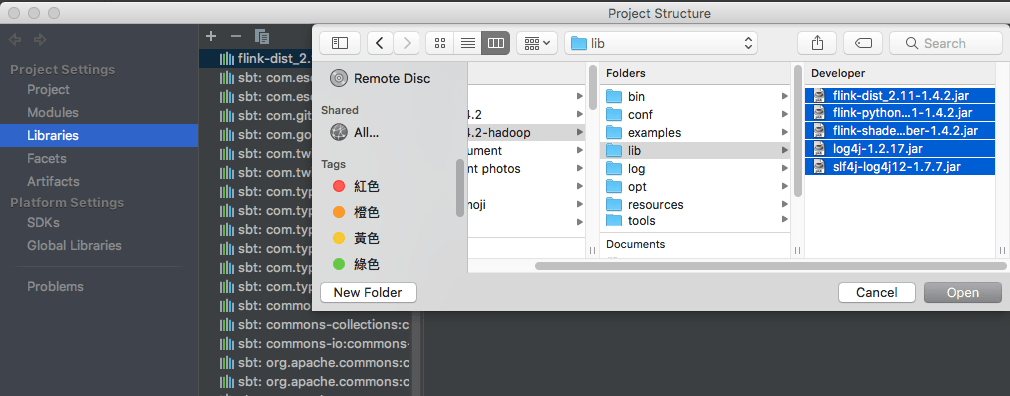
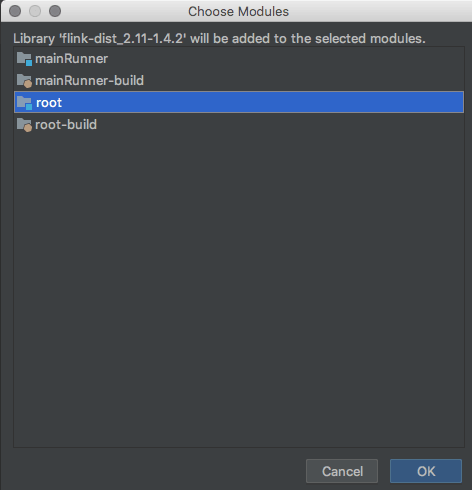
Run
WordCountagain, output should be like this:1 2 3 4 5 6 7 8 9 10 11 12 13 14 15 16 17 18 19 20 21 22 23 24 25 26 27 28(and,1) (arrows,1) (be,2) (is,1) (nobler,1) (of,2) (a,1) (in,1) (mind,1) (or,2) (slings,1) (suffer,1) (against,1) (arms,1) (not,1) (outrageous,1) (sea,1) (the,3) (tis,1) (troubles,1) (whether,1) (fortune,1) (question,1) (take,1) (that,1) (to,4) Process finished with exit code 0
Build quickstart project and send to flink web UI
Now let’s build quickstart project.
Use Intellij
Open project structure (
cmd + ;) and chooseArtifactsClick
+(Add)Choose
Jar->from modules with dependencies-> click OK with default valueClick OK with default value (Or you can edit name and output directory)
Choose
Buiild->Build Artifactsto build jar file, and output file will show up in the output directory after compiling.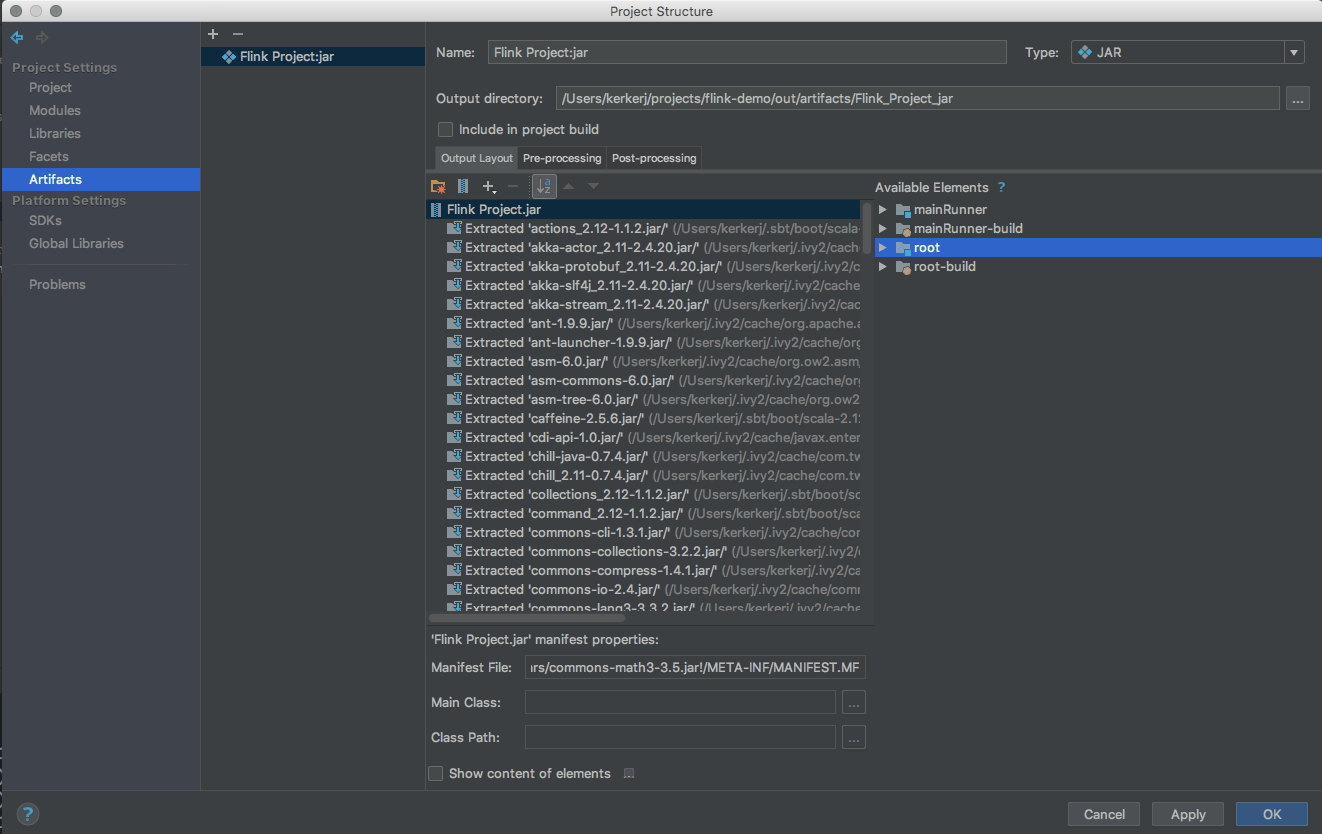
Use sbt
| |
The output file will be generated.
Run jar file in flink
Open http://localhost:8081/#submit
Upload the generated jar file, and check the uploaded item.
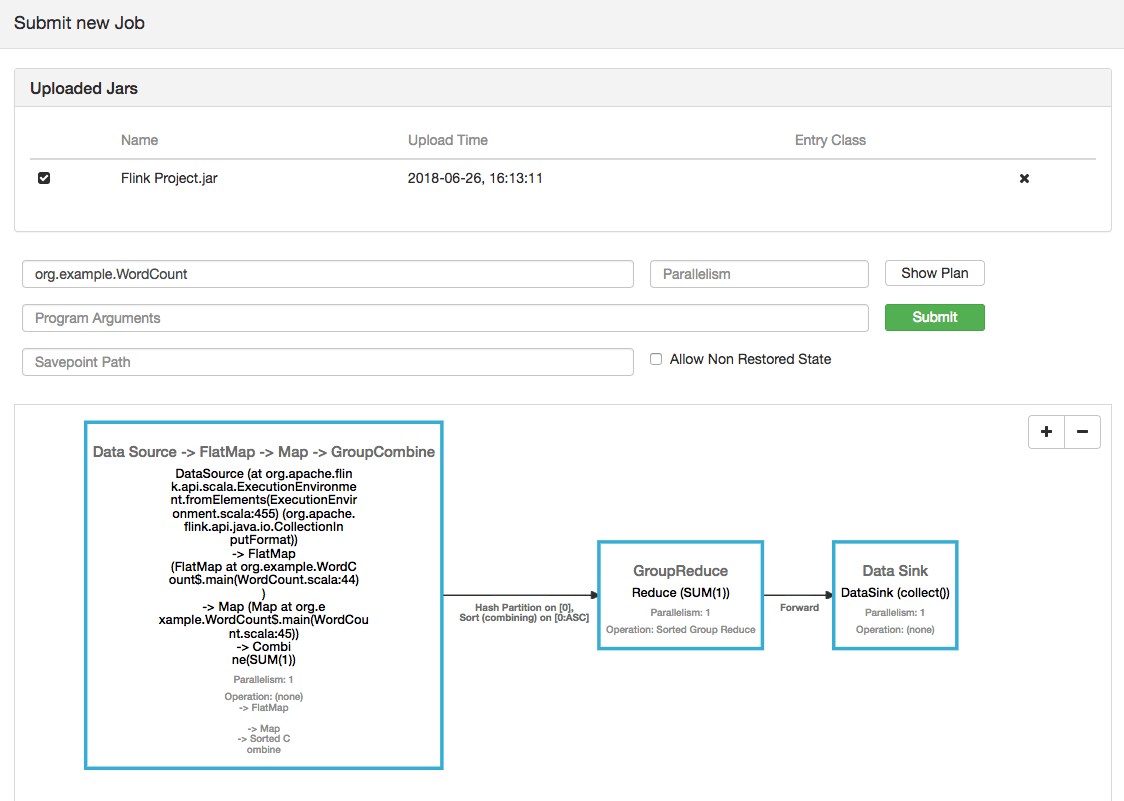
Ref: